Web UI
SQE serves a read-only web dashboard on the coordinator’s health port
(metrics_port + 1, default 9091). It shows the queries the engine is running
and has run, per-query timing and fragments, the cluster nodes, and live engine
metrics. The data comes from the coordinator’s in-memory query tracker and
worker registry. The page adds no new instrumentation and never touches the
query path.
Access
-
Open
http://<coordinator-host>:<metrics_port + 1>/. With the defaultmetrics.prometheus_port = 9090, that ishttp://localhost:9091/. -
The same port also serves
/healthz,/readyz, and/api/v1/status. -
The UI is off by default. Turn it on with:
[metrics]
web_ui = true
This is TOML-only: there is no
SQE_METRICS__*environment override for it.When off,
/healthz,/readyz,/api/v1/status, and the admin endpoints below still respond; the dashboard and the/api/v1/queries*endpoints return 404.
Security
The dashboard and its JSON API (/, /api/v1/overview, /api/v1/queries*,
/api/v1/workers, /api/v1/metrics/history) are gated by
require_admin_bearer (crates/sqe-coordinator/src/web_auth.rs, applied in
build_health_router in sqe_server.rs). A request needs
Authorization: Bearer <token> for an identity that holds an admin role. No
token, a bad token, or no auth provider configured is 401. A valid non-admin
token is 403. The UI is off by default ([metrics] web_ui = false); when
off, those routes are not registered and return 404.
/healthz, /readyz, and /api/v1/status stay open. They are the probe
surface for Kubernetes and load balancers. The open /api/v1/status carries
only status and node.role; build identity, worker URLs and the serving
block are at /api/v1/status/detail, behind the same admin gate as the
catalog refresh hook. The Prometheus /metrics endpoint
on the metrics port is also ungated. Keep the metrics and health ports on an
internal network.
The UI is strictly read-only. It cannot submit queries, cancel them, or change configuration. The query-detail endpoint omits session id, client IP, and roles so a leaked admin token still exposes less session metadata.
Tabs
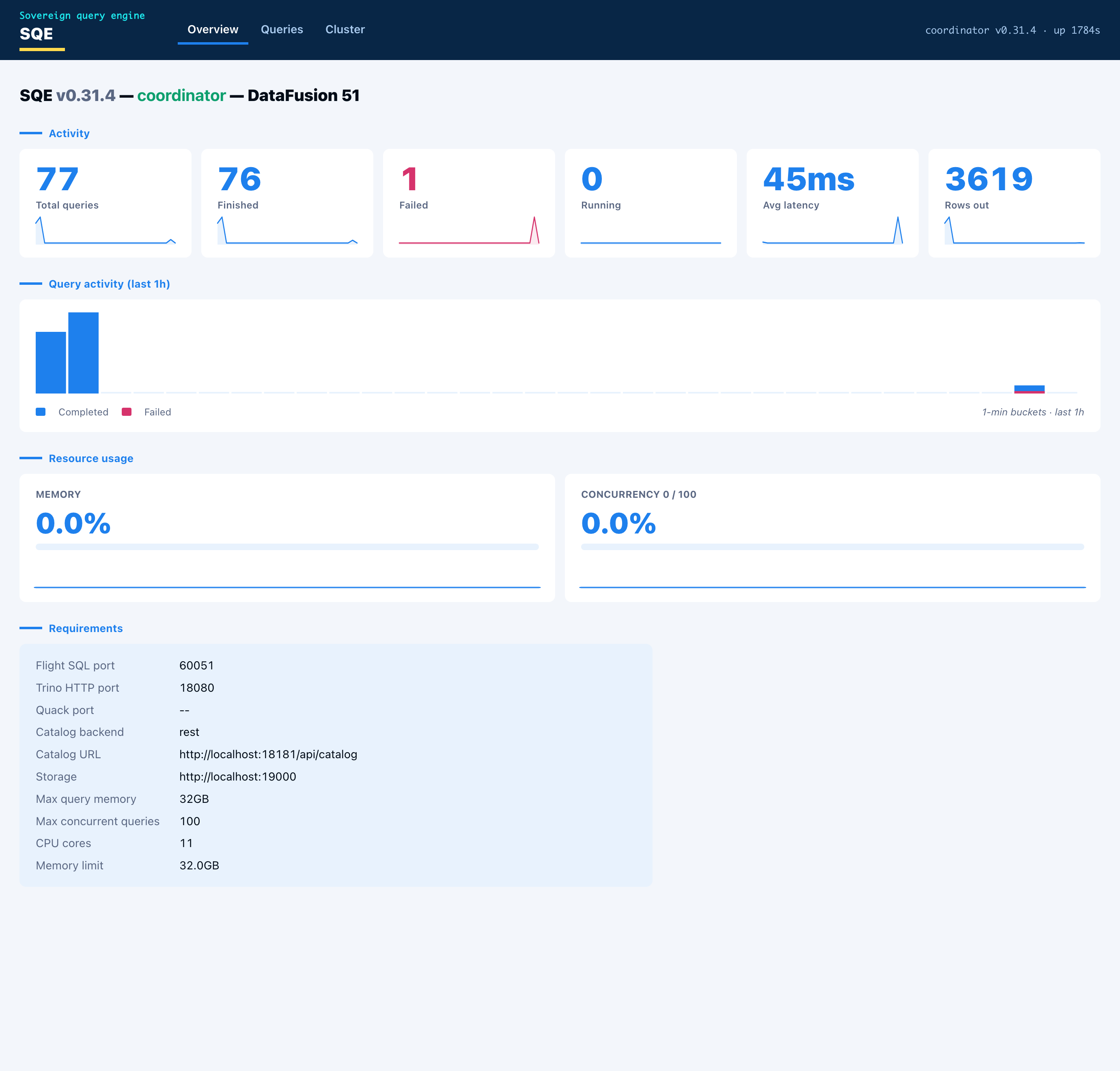
- Overview carries the node identity and capabilities (enabled protocols and ports, catalog backend and URL, storage, memory limit), live resource gauges (memory pool used, concurrency against the configured cap), and the engine metrics (queries by state, rows out, average latency) as stat cards. Each card has a one-hour sparkline, and a query-activity histogram sits below them.
- Queries lists recent queries with id, user, state, SQL, elapsed time, rows, and bytes scanned. Click a row for the detail: the queue, planning, and execution timing, the rows/bytes/spill/peak-memory totals, and the per-fragment breakdown showing which worker ran each fragment.
- Cluster shows the worker nodes with health and in-flight load. In single-node mode the coordinator lists itself as one node doing both roles.
Every chart is hoverable. Pointing at a bar or a sparkline point shows the time and value.
JSON API
The page is a thin client over a small JSON API on the same port. The endpoints are stable and safe to scrape directly:
| Endpoint | Returns |
|---|---|
GET /api/v1/overview | node, capabilities, resources, metrics |
GET /api/v1/queries?state=<running|finished|failed|all>&limit=<n> | recent queries, newest first |
GET /api/v1/queries/{id} | one query plus its fragments (404 if unknown) |
GET /api/v1/workers | worker nodes with health and in-flight load |
GET /api/v1/metrics/history | time-bucketed series for the charts |
GET /api/v1/status | status and node.role only (open) |
GET /api/v1/status/detail | full Ballista/DataFusion-style cluster status (admin) |
Admin endpoints
Mutating endpoints on the same port sit behind the same bearer + admin gate as
the dashboard. Unlike the dashboard, they are always registered, whether or
not metrics.web_ui is on: they are control-plane hooks, not part of the
read-only UI, and coupling catalog invalidation to “dashboard enabled” made the
hook silently unavailable on a default deployment. The gate fails closed, so
with no auth provider configured they answer 401 rather than running.
| Endpoint | Effect |
|---|---|
POST /api/v1/catalogs/refresh | Invalidates SQE’s catalog caches so a catalog created or rebound out-of-band becomes visible immediately, instead of waiting out coordinator.session_context_cache_ttl_secs. Drops every session’s cached SessionContext and the shared REST-catalog cache. An optional JSON body {"username": "<u>"} scopes the session drop to one user; a bodyless POST invalidates all sessions. Returns {"invalidated": "all" | "session:<u>"}. |
The platform’s workspace-provisioning path calls this right after it creates or
binds a Polaris catalog, so a new workspace catalog is queryable at once. A
pure-SQL client that only needs to refresh its own view can instead run CALL system.refresh_catalog_cache() (see CALL procedures).
# Global refresh (admin bearer required):
curl -XPOST -H "Authorization: Bearer $ADMIN_TOKEN" \
  http://coordinator:9091/api/v1/catalogs/refresh

# Scope the session drop to one user:
curl -XPOST -H "Authorization: Bearer $ADMIN_TOKEN" \
  -H "Content-Type: application/json" -d '{"username":"alice"}' \
  http://coordinator:9091/api/v1/catalogs/refresh
How it is built
- One HTML page with vanilla JavaScript, embedded in the binary with
include_str!. No Node toolchain, no bundler, no external assets, no web fonts or logos. The visual language follows the Schuberg Philis palette and layout with system fonts. - The metrics history is an in-memory ring buffer. The coordinator samples query
counts, rows, latency, active queries, and memory-pool usage every five seconds
and keeps a rolling one-hour window.
GET /api/v1/metrics/historyaggregates the samples into one-minute buckets, so the charts advance a bar each minute and the current bar refreshes every sample.
For a longer history, scrape /metrics into Prometheus and chart it in Grafana.
The web UI is the at-a-glance view that ships in the binary.